Reviewing tax adjustment records
Find the relevant lines in invoices and ledgers and read them side by side.
Legal Vault
Ask your work files, check available sources in the original, and prepare a draft.
Mac (Apple Silicon) · Windows · AI answers need an internet connection and your consent to send
Cloud AI trial: Until credits run out · 50 credits. Account required · No credit card.
01Connect a folder
Connect a folder on your PC, find what you need and open the original. Viewing and search support varies by file type.
02Ask and answer
Ask about your files and open available file, page or statute references to review the answer yourself.
03Write a draft
Prepare a draft from your work materials and review and revise the AI suggestions. Check important details and sources in the original.
04Check before sending
Cloud AI sends necessary content externally. Review the transmission scope and personal information detected and masked on your device.
Find the relevant lines in invoices and ledgers and read them side by side.
Find the clauses and write a review memo with their sources.
Collect the facts from your files and carry them into a draft.
Connect a matter folder and the AI answers and drafts from your files, parties, and goals. Every answer comes with its sources.
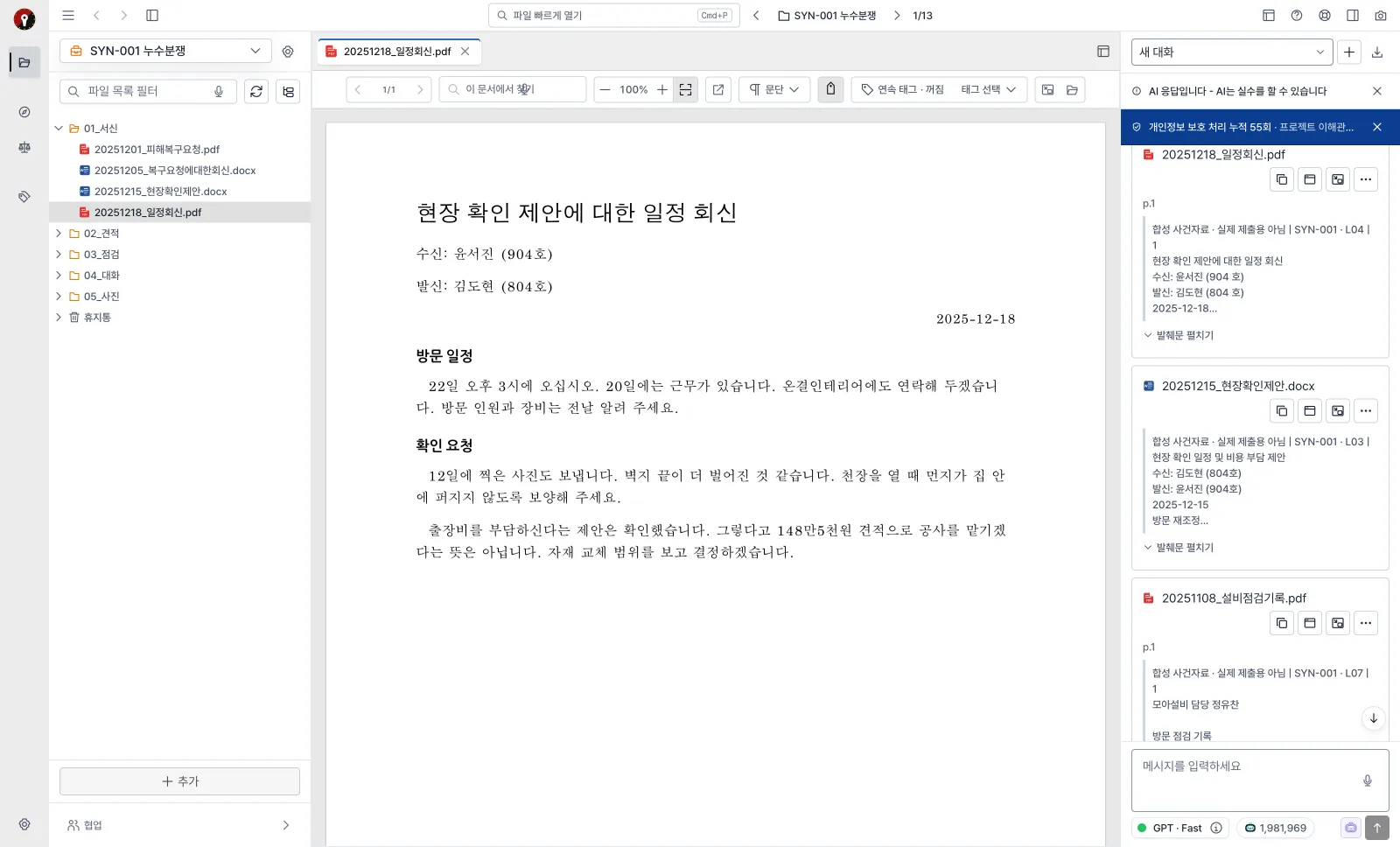
Each answer carries cards for the files, pages, and statutes it relied on. Click a card to open the exact spot in the original.
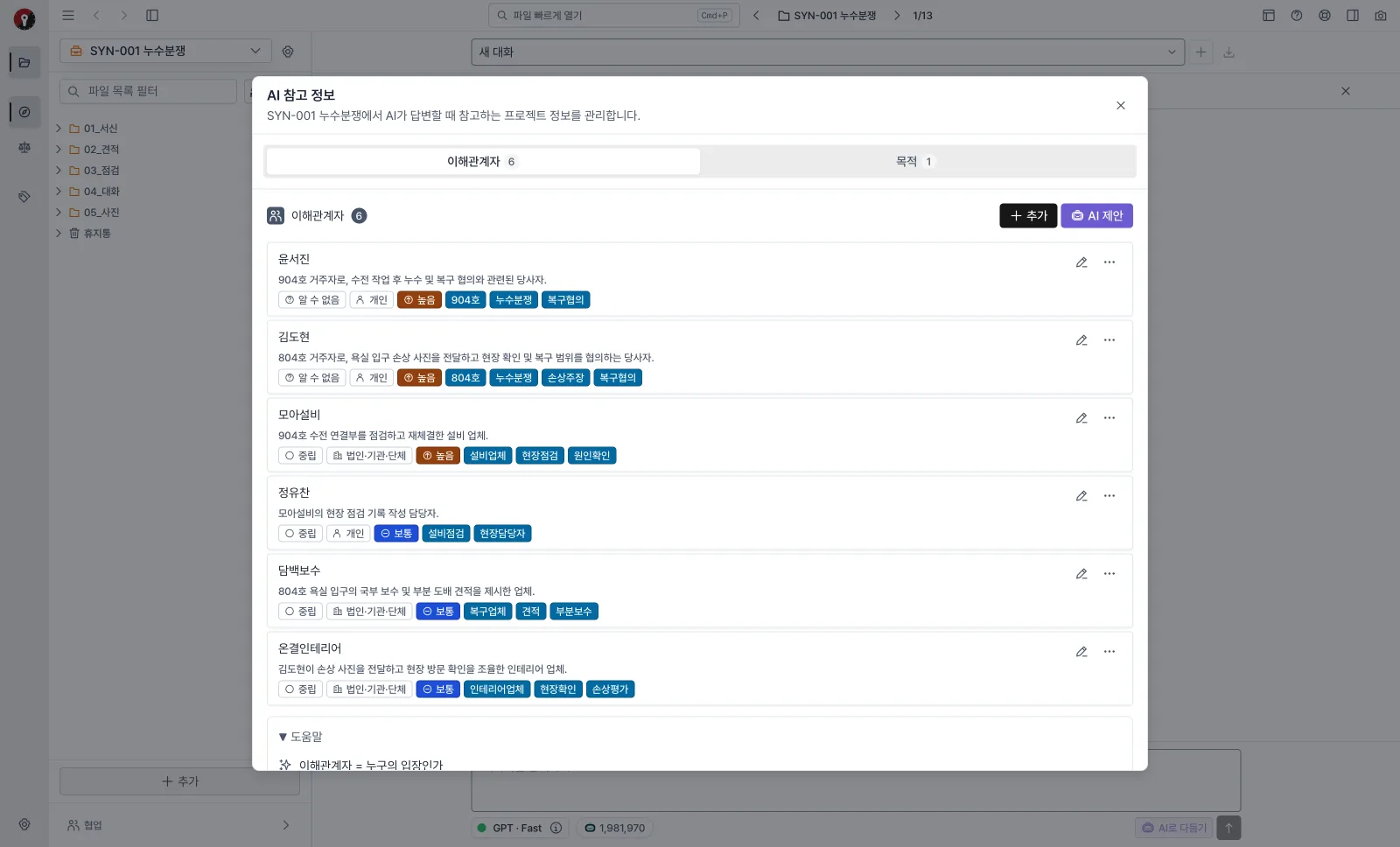
The AI finds stakeholders and matter goals in your case files and proposes them. Confirm your side, the opposing side, third parties, and goals such as "dismiss the claim", and later answers and drafts follow that context. It also helps avoid mixing up parties with similar names.
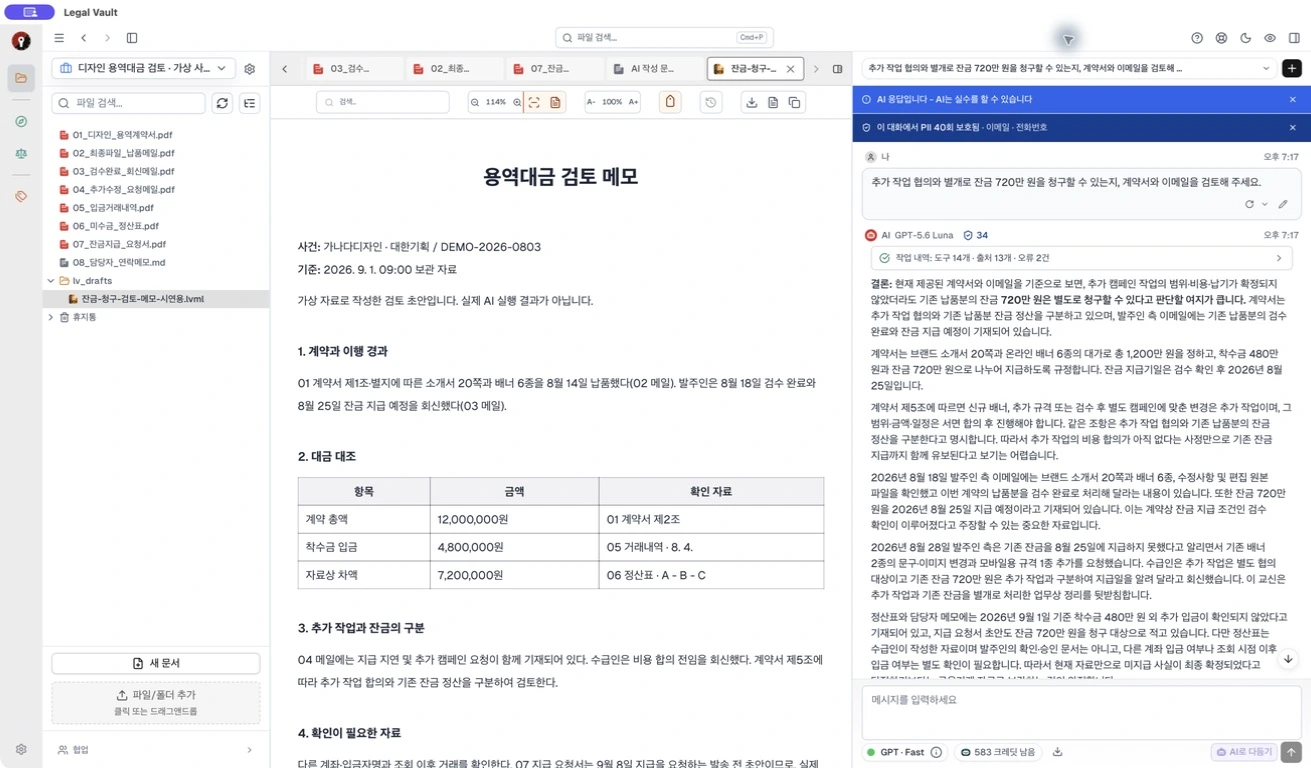
After researching your case files and statutes, the AI writes opinions, briefs, and review memos for the purpose at hand. Progress is shown step by step, and you can stop and resume writing.

Stuck on how to ask? Use “Refine with AI” in the chat input to improve your prompt. Review and edit the result, or restore your original wording, before sending it yourself. Requires a cloud plan and credits.
Actual desktop input · Synthetic question · Before refinement · Click to enlarge

Accept or reject each AI-suggested edit paragraph by paragraph. Export the finished document as DOCX or PDF.

Find and read statutes and case law from the Korean National Law Information Center inside the app, and use them as grounds for AI answers.
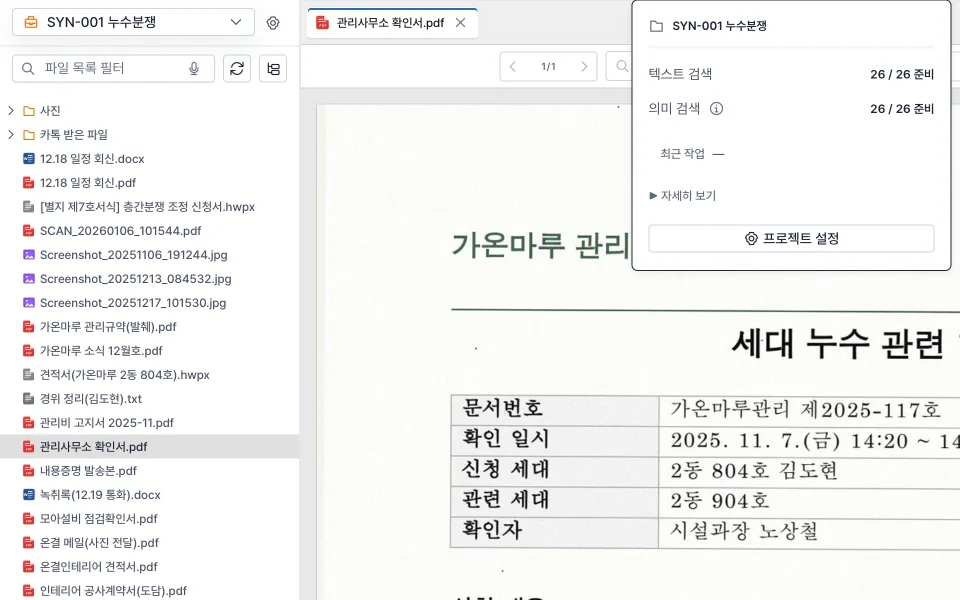
Connect a folder on your PC as a matter project. When you add or edit files, the search index updates automatically.
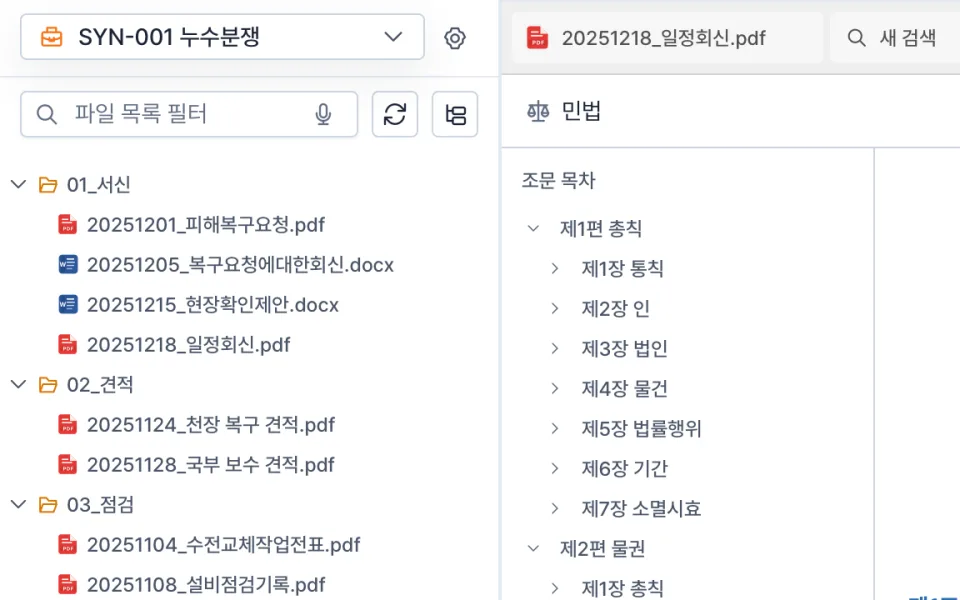
Open PDF, HWP/HWPX, DOCX, Excel, PowerPoint, email (EML), archives, images, audio, and video without extra programs.
Cloud AI
Ask Cloud AI questions and draft legal documents using case files, legislation, and case law connected to your project.
Review evidence — Open files from the explorer and read the original alongside the AI answer.
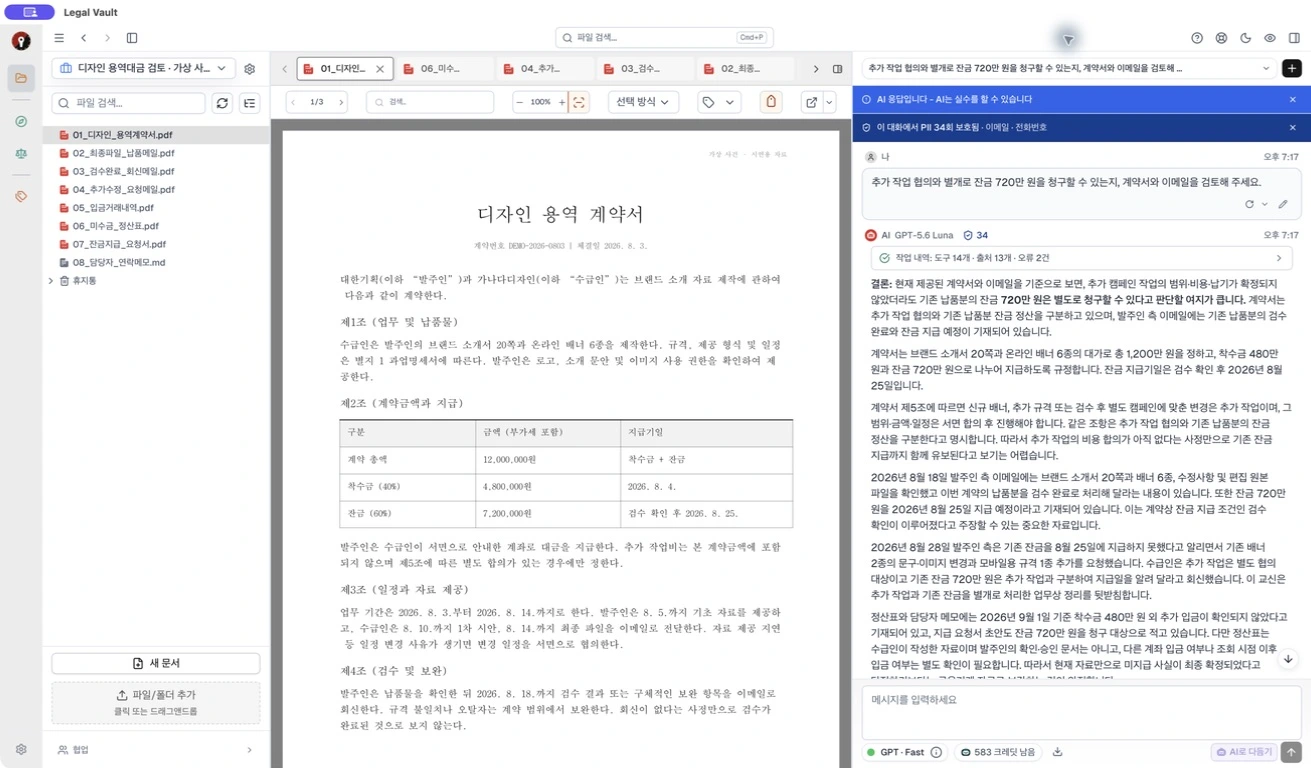 View full size
Draft documents — Write and review a draft with the file explorer, LVML document and AI Chat in one workspace.
View full size Sensitive Data Protection
When a task needs Cloud AI, Legal Vault detects likely personal data before anything is sent and lets you review the masked preview first, reducing sensitive-data exposure risk.
Document storage and semantic search run on your device.
Check detected personal information and the masking preview.
Review and send the content needed for the AI task.
 View full size
A different way to keep files
You do not need to upload original files to a server to store and search them. Legal Vault connects folders on your PC and manages documents and search indexes on your device.
Store and search on my PC
AI uses the needed content
Originals and search indexes stay on your PC. Only the minimum data needed for the AI task is sent to an external server with your consent.
File storage + AI processing
File copies are uploaded to an external server, where AI works with the stored files.
Keeping fewer copies of original files outside your device reduces reliance on a server's access, retention, and deletion policies. You retain direct control over where documents live and who can access them.
Create an account, try it free, then choose the plan you need.
Cloud AI available now: GPT Fast
Try Cloud AI with included credits, without a time limit.
Powerful legal analysis with GPT Fast Cloud AI — no high-end machine required.
Windows · macOS
Install the app and create an account to start your free trial without a time limit. No credit card required.
Download the appInstalled on your PC. Runs on your PC.
Version 0.0.35 · closed beta